skip to main content// blog
 Solo Design Sprint Week 4 - System for Claude to observe how I workOver the course of my career, I learned that I absolutely love designing and problem solving. On the other hand, I don't enjoy parts of the work around reflecting and talking about my past projects. While I recognize the great value in reflecting, it is often a very time-consuming process and the first draft tends to give me the blank canvas syndrome. To distribute this effort throughout the course of my project in hopes that it'll reduce the dreaded feelings, I started writing reflections daily. Prior to this week, I had experimented with a few things using those daily notes: I had Claude summarize my reflections on my projects, and I even had it try writing the first draft for me. But I didn't like anything that it produced for some reason, so I decided to take a different approach. What I did I made the assumption that my initial approaches with Claude failed because Claude didn't know how I crafted my story and what my process looked like. It was like a new hire on day one being handed my big presentation. So instead of handing it the work, I created a system to let it watch me do the work first. Over the next several weeks, Claude will simply observe and report its findings, while I continue to write my first drafts and do the rest myself. Claude will take notes, and I will decide later whether those notes become a skill. Using my daily reflections, FigJam, and published posts as context, I created this "shadowing" system. It will produce two outputs: 1) an observation summary on how my week went, which gets sent to me via email and push notification, and 2) a note that Claude keeps to itself for its own knowledge. What I learned As someone with no engineering background, I'm always low-key paranoid that AI might be writing things on my computer that could potentially cause harm. What I'm learning through these workflow automation projects is that they can easily get quite complex, and this doesn't help with my paranoia. On the other hand, it is also an opportunity to learn how things work because, now, instead of reading about it, I can actually learn by doing. To lean into this, something I found works well for me is to visualize my own interpretation on how everything works together behind the scenes and confirm that understanding with AI. This has helped me quite a bit so far with learning and also keeping the sense of control. This week was a lot more experimental than other weeks, and unlike previous projects, I didn't have a clear problem and solution. Nonetheless, I'm excited to see how it turns out, and there's more to come on that. If you've had a similar problem and did any experiments like I did—with or without AI—I'd love to hear about it.
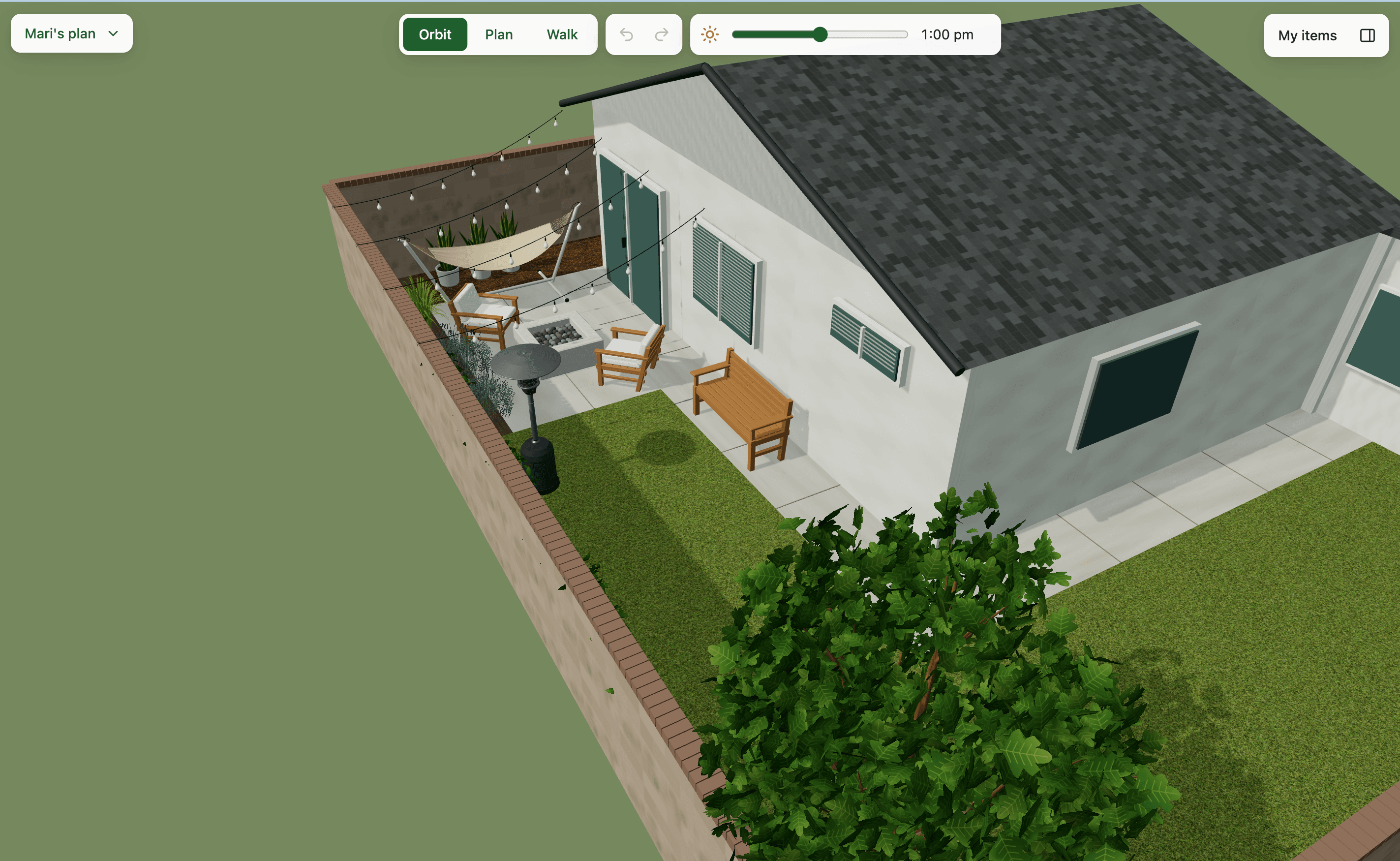 Solo Design Sprint Week 3 - Backyard 3D editorMy husband and I wanted to redecorate our backyard, but imagining how the new patio furniture and plants would look in our own space off of pictures you see online is tricky. There are tools that let you create a floor plan and place some generic furniture, but if we wanted something more robust, those were far too technical and expensive for our small personal use. What I did I built an app that has a virtual 3D model of my backyard along with controls that let you change the view of the backyard, manage items in the yard, and change the time of day to see where the shadows fall. The date in the system automatically adjusts so the height of the sun is more accurate, but you can change it manually if you want to see how it’d look in December, for example. To add some fun flair and make it more useful, I added an AI feature that lets you generate new items directly within the app, in a style consistent with the existing ones. Since this tool was meant for multiple people (mainly my husband and me) to collaborate on, I turned it into a web app that lets us individually create and save our plans in a shared workspace. Check out this demo version if you want to play around. This demo version is not my house and it doesn’t save your changes. You can see the AI feature but generation is blocked for cost reasons 😉 What I learned This was a meaty project so I've written my process and learnings in detail below. Here are the high-level ones: 1. Personal projects can get a lot more fun if there's a real user with a real purpose (details in step 1) 2. Having AI create a first draft that you hate could help you learn its capability and give you ideas you hadn't thought about (details in step 2) 3. There are many ways to save on tokens, and the biggest one for me was picking the right model for the right job (details in step 3) 4. I reminded myself of the importance of resisting the urge to include AI in products just for the sake of it, because it can get unnecessarily complex and expensive (details in step 5) ----- Step 1: Build a mediocre first draft When I first started this project, I sent one prompt to Claude to see what it could produce. At this point, I didn't know much about how 3D modeling works or whether the AI tools I had were even good for it. ^step-1 After some back and forth where I sent a few photos of my backyard, it made this 3D model (and almost hit the token limit). I had mixed feelings about this result. I was somewhat impressed, but there was close to zero sense of joy, and the heavy token usage was expected but disappointing. I was about to toss this into the "experimented & discarded" pile when my husband came into the room. I reluctantly showed it to him, and he said, "WOAH, you made this? That's so cool. This is exactly what I wanted." Then he started pointing out things that would make it more useful, such as accurate measurements. This was the moment it clicked for me. My husband's reaction showed me that I had a real user with a real purpose, and this gave me permission to go deep into what felt like a silly project at first. Step 2: Experiment with different models I had recently read about how good OpenAI's Astra was at generating 3D models. So I decided to give it a try. Claude's first output had actually helped me form clearer opinions on what I wanted to see, so I gave more specific requirements and wireframes to Codex (Astra). Keep in mind that at this point my vision was quite ambitious, and needless to say, not everything here made it to the final product. ^step-2 After this prompt and some back and forth, Codex created this with a fake backyard. At this point, I had not sent it any photos or measurements since I just wanted to see its capabilities and token usage. What impressed me was the speed and quality of the 3D output. The 3D models of the backyard and items were significantly better than what I got from Claude with Opus 5.5. Where it fell short was the execution of the UI. While I provided the wireframe and instructions, it misinterpreted what I was going for, and it also added a lot of extra things that became noise. I also hit the token limit so fast that it couldn't finish everything it planned for until the next token refresh. Nonetheless, this experiment was totally worth it, because it gave me a clear idea of how I should execute. Step 3: Assign the right jobs to the right models The experiments in previous steps taught me a few things about the models. ^step-3 1. Opus' UI execution was better than Astra's 2. Astra was superior at 3D modeling 3. Claude used tokens more efficiently (I never ran out of tokens with Claude, but with Codex I did within 1 hour) Based on this, I decided to split the job into the following: - Planning and orchestration partner --> Opus - 3D modeling --> Astra - UI development --> Opus or Sonnet This split ended up working so beautifully that after assigning the right job to the right model, I never ran out of tokens for the rest of the sprint. Step 4: Take your hobby to the next level This was such a fun part. I started off by taking a bunch of photos of my backyard, then measurements of all the key parts. Our backyard is small, so luckily measuring it only took about 10 minutes. I made a small drawing of the backyard to visualize the bird's-eye view as well, and sent everything to Codex to build the 3D model. Before sending a prompt to Codex, I workshopped the prompt with Claude so that the 3D model it produced would be in the right shape for Claude to pick up. Given how fast Codex had burned through tokens, I wanted to be cautious with the prompts so I could increase the chance of getting the right output in one go. The result was arguably the most exciting moment in this sprint. I almost cried. Step 5: Build an actually useful AI feature When I first started this project, I had lots of exciting ideas. I imagined it as The Sims meets Figma meets Pottery Barn. I wanted this virtual yard to have an AI agent, like Figma's, that you could just talk to to change anything in the yard: create new furniture, resize it, move it, or what have you. Maybe I'd even throw in a feature where you could buy that furniture from real shops! ^step-5 I quickly realized the shopping portion was a bit much for an MVP, but I still wanted to try designing and building the AI agent. It was going to stretch my skills in thinking about an AI agent's interactions. My initial wireframe looked like this: Then, somewhere between designing the interactions in Figma and chatting with Claude about the implementation, I realized this was a feature that was not only ambitious but also expensive to run. AI interactions within an app have to be connected to APIs, and that's a separate cost from my monthly subscription to Claude/Codex. Not knowing what the token usage of these interactions would be, it felt like too much effort and risk for no clear benefit. Furthermore, if I wanted good AI output, some agent actions had to come from Anthropic's API, while others, like generating a 3D item, had to come from somewhere else. Managing this app was already requiring me to juggle between several applications; I didn't need another thing that I had to keep an eye on. So what was the feature we really needed? One hurdle that came up in early user research (aka my husband) was that the library of items needed to be much richer. This was where an AI feature could actually be useful. I decided to create about a dozen pre-set items in addition to what was already in the yard, to give enough coverage to start. This included some standard items like a patio couch, table, and fireplace. Then, if users can't find what they're looking for, they can generate them with AI. The irony is that throughout my previous jobs, I was the one advocating for AI to be used for real problems and telling my stakeholders to resist the urge to throw AI at everything. But in this project, I was on the other end. While it was ironic, it made me understand the urge better. When you experience the magic, it's hard not to be excited and want to do that yourself! Luckily, financial constraints made me think twice. Step 6: Build yard items (furniture and plants) with Codex/Astra as the foundation for the in-app AI feature Prior to this project, I had never built anything in 3D, and while I am by no means an expert after this week-long project, Claude was an amazing partner in accelerating my learning in the 3D design space. I learned a little bit about how the 3D components are structured so I could prompt Codex better, and about what tools already existed for this type of work so I could decide the best approach for the in-app item generation feature. I had Codex run in the background and build items in the project folders directly so Claude could pick them up and show them in the app while it worked on the UI controls. Here, once again, the output of Astra did not disappoint. The look of the pre-generated items fit the theme of the existing space perfectly, with just the right amount of detail to feel realistic. What I was even more delighted to find out was that this had set up a perfect foundation for the in-app item generation. Codex created a specific script to generate items in certain styles, so it only made sense for the in-app AI feature to use this script and call OpenAI's API, so any new item it generates matches the style of the existing ones. Step 7: Ship, test, and iterate One thing Claude asked during the build that I didn't think much about at first was whether I wanted this to be a shareable, collaborative space. This was a personal project, after all, so it didn't have to be. I could have just kept working in the local files with my husband sitting next to me. But part of me just wanted to understand how things would work if I made it into a web app with a shared workspace, so I decided to do that. It taught me a bit about how a web app like this differs technically from my portfolio website, which stores no data. The more we played around with it in prod, the more ideas started flowing. What if it could allow users to upload photos and turn them into a model themselves? This was my original idea, which I deprioritized because, as you can imagine, it was too much for personal use, but wouldn't that be really cool? And what if this could extend beyond just the backyard and could be for the rest of the house? It could have a "room" or "space" concept that lives one layer above. And then of course, what if you could tap a piece of furniture and have it find similar-looking ones in real stores for you? If you can't tell by now, I had so much fun with this project, and I could have easily kept going. I may pick it up again or continue working on this in the background, so stay tuned for potential future updates! And if you made it this far, thanks for coming along on this journey with me. It was a long one 😄
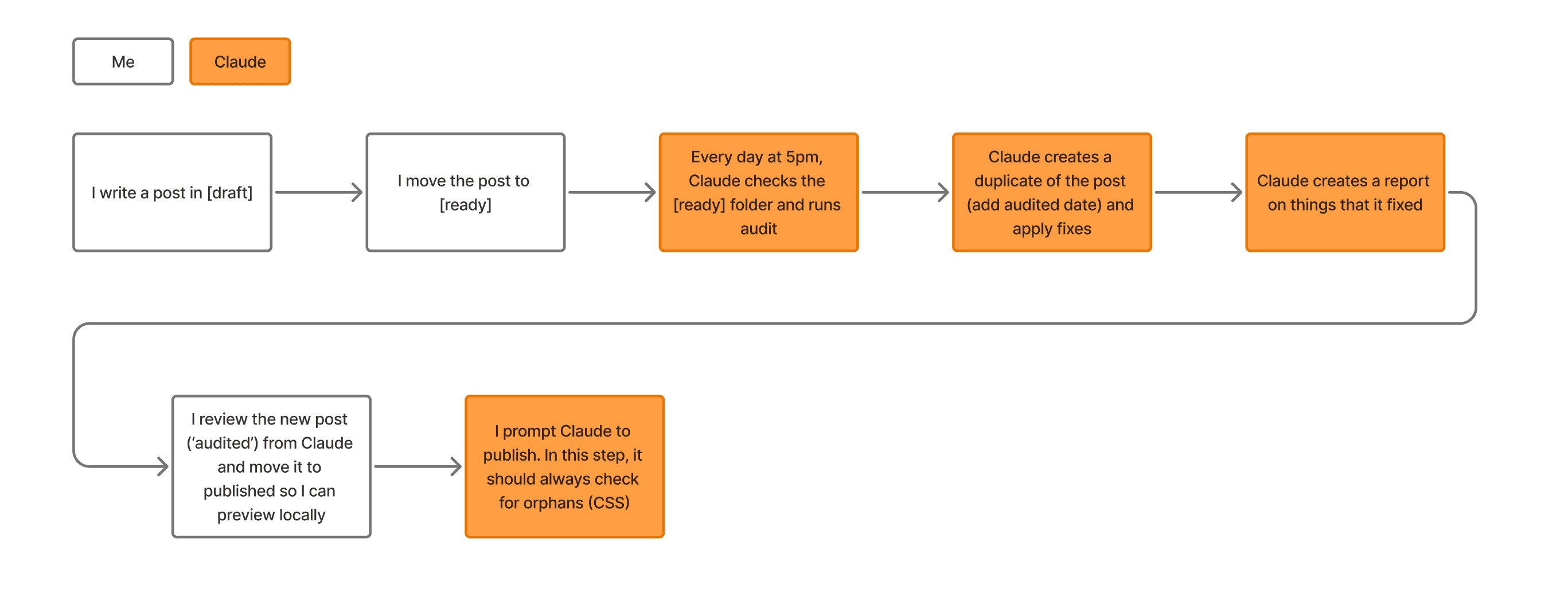 Solo Design Sprint Week 2 - Homemade CMSI always knew that when I started my own blog, I wanted it to live in my personal website, which was mainly serving as my design portfolio. While I could have simply put the link to my Medium page, I thought it would be better if the blog could fit more natively into my website. For one, it's just a better user experience if users don't have to jump to an external link, and two, having my design work and thoughts (blog) under the same website with consistent design gives both a consistent personality. What I did I built my own blogging system that turns my Obsidian notes into published posts, which works like a small homemade CMS. I designed the blog's list page and the posts themselves (this page!) in Figma using my website's existing design system, then had Claude build it. Along the way, I discovered opportunities to use AI to audit my posts, such as checking for grammar, detecting and hiding any sensitive information in screenshots, generating alt text, and detecting and fixing widows/orphans. I created a system for Claude to automate this auditing process, where it looks for any posts that are marked "ready", applies the changes based on their audit, and creates a report for me to review before publishing. What I learned Takeaway #1: Don't underestimate the power of design systems This was one of those projects where I re-recognized the value of design systems heavily. Because my past self had built one in Figma and code, designing and building the UI was a breeze. One potential complexity I noted before building was making sure Markdown formatting, like bold text, borders and quotes, matched the design system. Claude did a beautiful job in mapping them and I felt that moment of magic when I saw Claude's first output looked exactly like what I had in Figma. Takeaway #2: Learn how to act like a manager when working with AI My relationship with AI also had a big shift this week. When I started this project, I knew I wanted to include some form of automation, so the question I was asking myself was "what can I automate?" I quickly started to realize that there was a trap in this question. This question was based on the ability of AI, which is too open-ended. Theoretically, AI could do anything. Instead of giving me clarity, this question led to more mess and confusion. Who was really in charge here? I was, and I had to start acting like it. That shifted my question to "what if I had an assistant?" instead. This made it clear what I wanted to hand off, what I wanted to see, and how often. One of the biggest challenges in AI adoption is people not knowing what to hand off. A few years ago when generative AI was just getting introduced to our lives, I heard someone say those who are in managerial positions will have an easier time adopting AI. I've never been a manager myself, and I often have to remind myself to act like one when interacting with AI. This was one of those projects that challenged me to shift the mindset and improve my relationship with AI.
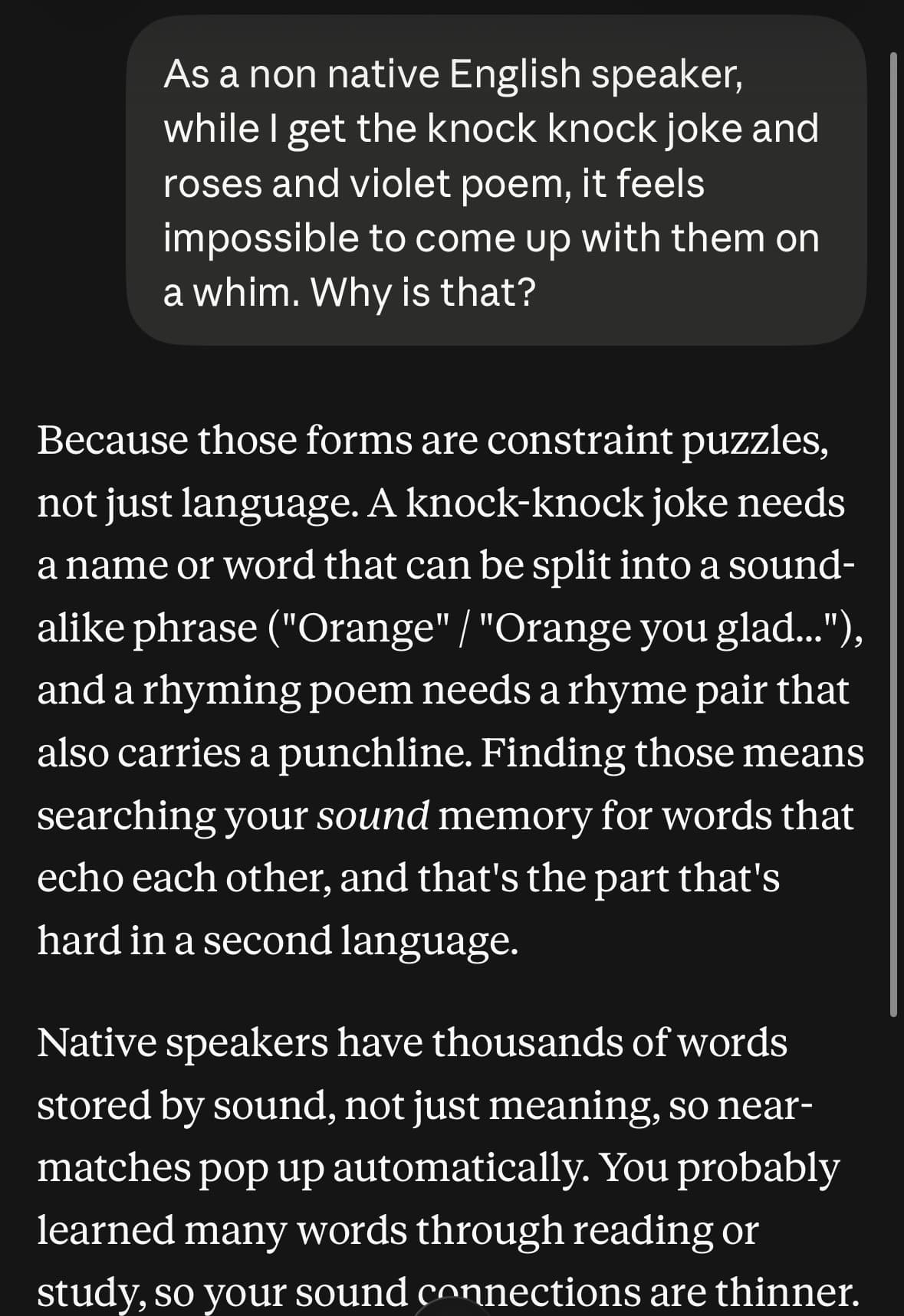 Questions I’m too embarrassed to askFor those of you who don't know me personally, I spent the majority of my childhood in Japan. I grew up in a family that speaks only Japanese and went to local schools, which makes English my second language. I've spent about 20 years living in the US, which is more than half of my life. And yet, I still have the hardest time really “getting” certain things. Two examples are the knock-knock joke and the “roses are red, violets are blue” poem. I’m sure I’ve googled what they meant at some point and I’ve asked native speakers before, but I never really got it. Now, with AI, I have this super knowledgeable thing that has read everything in the world that made it to the internet, but doesn't have the judgment and emotions of humans (yet). I went ahead and asked Claude to explain the knock-knock joke and the roses and violets poem, and, to take it even further, I asked why it feels so hard for non-native English speakers to get these or put them into practice. And it gave me an answer that made a lot of sense! By the end of this conversation, I was able to create a roses and violets poem myself 🌹 I even got a star ("it's a solid first try!") from teacher Claude. This is arguably one of my favorite things about AI. In a way, it helps me remember my inner child who was curious and asked everything because there was no such thing as shame or fear of judgment.
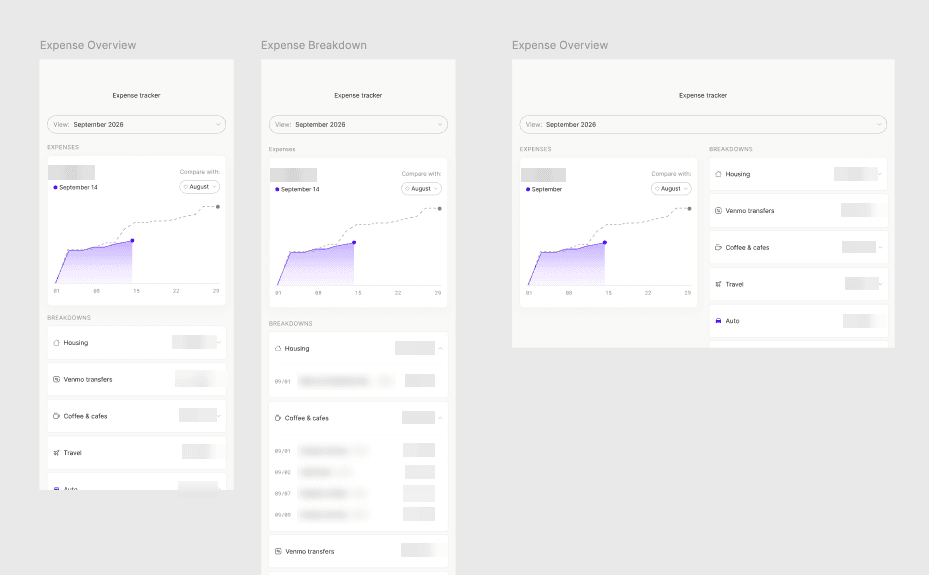 Solo Design Sprint Week 1 - Expense trackerThis week, I decided to work on something to track my monthly expenses better. I used to be a Mint user until it was gone (💔), and I've used Origin when it was part of my old company's benefits. While I could sign up for these third-party tools again, why don't I just build it myself so it's stripped down to the only features I need without paying extra? What I did I created an automated job in Claude Cowork to visualize my expenses against the budget. For now, due to my comfort level with security and cost, I chose to manually import the CSV files of my spending to local folders rather than doing anything more robust. I designed a polished UI for the data visualization, and created a small design system. What I learned If I were to describe this week in three words, it would be: Figma Agents FTW🥇. The most exciting moment this week was when I learned how to utilize them to create a design system from the existing frames. I also used them to detach all the components from older designs so they stay static. These things were achievable before but required multiple plugins. It was one of those things that fit so seamlessly that I didn't have to force AI into my process, aka the way it should be! Throughout this week, I also documented my process in FigJam with just some rough screenshots and a few sticky notes. One thing I always wanted to get better at in my previous roles was documenting my process, and this was such an easy way to do so, and it even helped me write this post. While I'd like the expense tracking to be a lot less manual, I am still skeptical of how much I can trust AI to have deeper access to my financial information. I have seen people building their own expense tracking system similar to this with AI. If you've built one too, what has your experience been and how do you make it friction-free and useful while keeping your sensitive data safe? The details, if you care 😁 Day 1: Setting up the foundation As much as I wanted this to be as friction-free as possible, I wanted to be cautious of what I share with Claude. Based on this, I figured starting with locally saved CSV files and using Claude Cowork to access the folder to visualize the numbers would be a good start. I had a few initial back-and-forths with it to figure out its output quality and general capability, but overall I was quite happy with the output and categorization it was providing me. Once I asked Claude to show the breakdown of each expense category, it created this artifact. At this point, no design instruction was given. It was a good start as I was able to see what I needed to see. I decided to treat this as a wireframe that had the components I needed in my own expense report. I ended the day by having Claude create an automated job that runs every month or whenever I upload CSV files to the folder. Day 2: Visual polish and a delightful moment with Figma Agents I could have called the first artifact that Claude made good enough and called it a day, but I wanted to have fun with it and give it a facelift 💅🏼 I took a screenshot of Claude's artifact and went to Figma. I identified the components that were working for my use case and created an information architecture, went to Mobbin to look for inspiration, then created a mockup in Figma. Once I started to see some patterns, I wanted to create a small design system so I can provide Claude with design guardrails for future updates. Until this point, I hadn't quite figured out how to utilize Figma Agents, but turning the existing designs into a design system with it was ✨ delightful. ✨ I used Figma Agents to create number variables that are divisible by 4 up to 64 and apply them to all the existing spacing and corner radii. I also had it audit the unused number variables and delete them to clean up. I had it list out all the text styles I was using, clean them up, turn them into reusable styles and apply them. I did the same for colors and had it create variables and apply them. Working on components with Figma Agents was hit or miss, but overall working with the agents this way saved a ton of time for me and this was honestly one of the perfect moments where I could hand off the tedious tasks to AI. Lastly, I went back to Claude, gave it the Figma file, and had it tell me what else I could provide. I ended my day here so I could incorporate the changes Claude suggested the next day. Days 3 & 4: Build, test, and iterate The second half of the sprint was going through the loop of: going to Claude to build, testing and identifying areas to improve, gathering inspiration from Mobbin and Claude, and going back to Figma to iterate. One of the things I brainstormed with Claude was showing some sort of key takeaways at the top. There is always this question in data analytics — "what do I do with this data?" — and I felt this myself. Reading the heavy text at the top felt like something that was never going to be useful, but I tried it anyway and asked Claude what kind of takeaways it could pull. I also experimented with adding more visualizations. One thing that felt missing from the first iteration was the trend / comparison aspects. One thing I thought could be useful was showing a bit more depth into how I was tracking against the budget. For inspiration, I used Mobbin and familiar interfaces like iOS, and I also used Claude to come up with several variations. This is what the final output looked like.
 no imageIntroducing “Solo Design Sprint”What this is Whenever I have a free week between job search and life commitments, I will pick up an idea, work on them throughout the week, and post the outcome and reflection on here. The idea can be pretty much anything that involves a computer in the process - it can range from something practical, like automating a boring workflow, to something weird and fun, like imagining how those trees I saw at a nursery would look in my backyard, to maybe even something that involves creating physical items. Why I'm doing this Four months ago, I got laid off from my full-time job as a product designer. Design tools and processes are evolving faster than ever, and in this competitive job market, I was starting to feel that the longer the unemployment went on, the further behind I'd fall. Given the luxury of time, I also saw this as an opportunity to explore tools and creativity in ways that I didn't always get to. Furthermore, one question I get asked in every interview this year is how I use AI in my day-to-day. As I thought about this, I realized I didn't have a clear POV and I still had lots to explore to figure this out. My hope is that through these exercises, I will figure out a healthy relationship with AI. :) What this is not The purpose of these exercises will not be to create something groundbreaking or impressive. The goal is purely for myself to stay current and learn by doing, and, ideally, from others if this reaches the eyes of fellow creators.
- no imageWelcome!For so many years, I've said I'd write a blog. Every year, I write down goals for myself, and for the last several years, the list has always included "publish one blog post." It just never happened. The biggest reason is that I feel very insecure about my writing because English isn't my first language. Now that this is less of a problem, thanks to AI that can spot any grammar mistakes I make, I feel a bit more courageous. Pair that with unemployment (aka more time for my endless thoughts), and I decided to finally do it this year. I'm praying that this one post will at least hold me accountable to write more 🤞🏼 I plan to write mostly about tech and design, but I may occasionally slip in some personal pieces like parenting and other fun things that happen outside my professional life. Stay tuned for future posts, and thanks for stopping by.