
Solo Design Sprint Week 3 - Backyard 3D editor
My husband and I wanted to redecorate our backyard, but imagining how the new patio furniture and plants would look in our own space off of pictures you see online is tricky. There are tools that let you create a floor plan and place some generic furniture, but if we wanted something more robust, those were far too technical and expensive for our small personal use.
What I did I built an app that has a virtual 3D model of my backyard along with controls that let you change the view of the backyard, manage items in the yard, and change the time of day to see where the shadows fall. The date in the system automatically adjusts so the height of the sun is more accurate, but you can change it manually if you want to see how it’d look in December, for example.
To add some fun flair and make it more useful, I added an AI feature that lets you generate new items directly within the app, in a style consistent with the existing ones. Since this tool was meant for multiple people (mainly my husband and me) to collaborate on, I turned it into a web app that lets us individually create and save our plans in a shared workspace.
Check out this demo version if you want to play around. This demo version is not my house and it doesn’t save your changes. You can see the AI feature but generation is blocked for cost reasons 😉
What I learned This was a meaty project so I've written my process and learnings in detail below. Here are the high-level ones:
- Personal projects can get a lot more fun if there's a real user with a real purpose (details in step 1)
- Having AI create a first draft that you hate could help you learn its capability and give you ideas you hadn't thought about (details in step 2)
- There are many ways to save on tokens, and the biggest one for me was picking the right model for the right job (details in step 3)
- I reminded myself of the importance of resisting the urge to include AI in products just for the sake of it, because it can get unnecessarily complex and expensive (details in step 5)
Step 1: Build a mediocre first draft When I first started this project, I sent one prompt to Claude to see what it could produce. At this point, I didn't know much about how 3D modeling works or whether the AI tools I had were even good for it.
After some back and forth where I sent a few photos of my backyard, it made this 3D model (and almost hit the token limit).
I had mixed feelings about this result. I was somewhat impressed, but there was close to zero sense of joy, and the heavy token usage was expected but disappointing. I was about to toss this into the "experimented & discarded" pile when my husband came into the room.
I reluctantly showed it to him, and he said, "WOAH, you made this? That's so cool. This is exactly what I wanted." Then he started pointing out things that would make it more useful, such as accurate measurements.
This was the moment it clicked for me. My husband's reaction showed me that I had a real user with a real purpose, and this gave me permission to go deep into what felt like a silly project at first.
Step 2: Experiment with different models I had recently read about how good OpenAI's Astra was at generating 3D models. So I decided to give it a try. Claude's first output had actually helped me form clearer opinions on what I wanted to see, so I gave more specific requirements and wireframes to Codex (Astra). Keep in mind that at this point my vision was quite ambitious, and needless to say, not everything here made it to the final product.
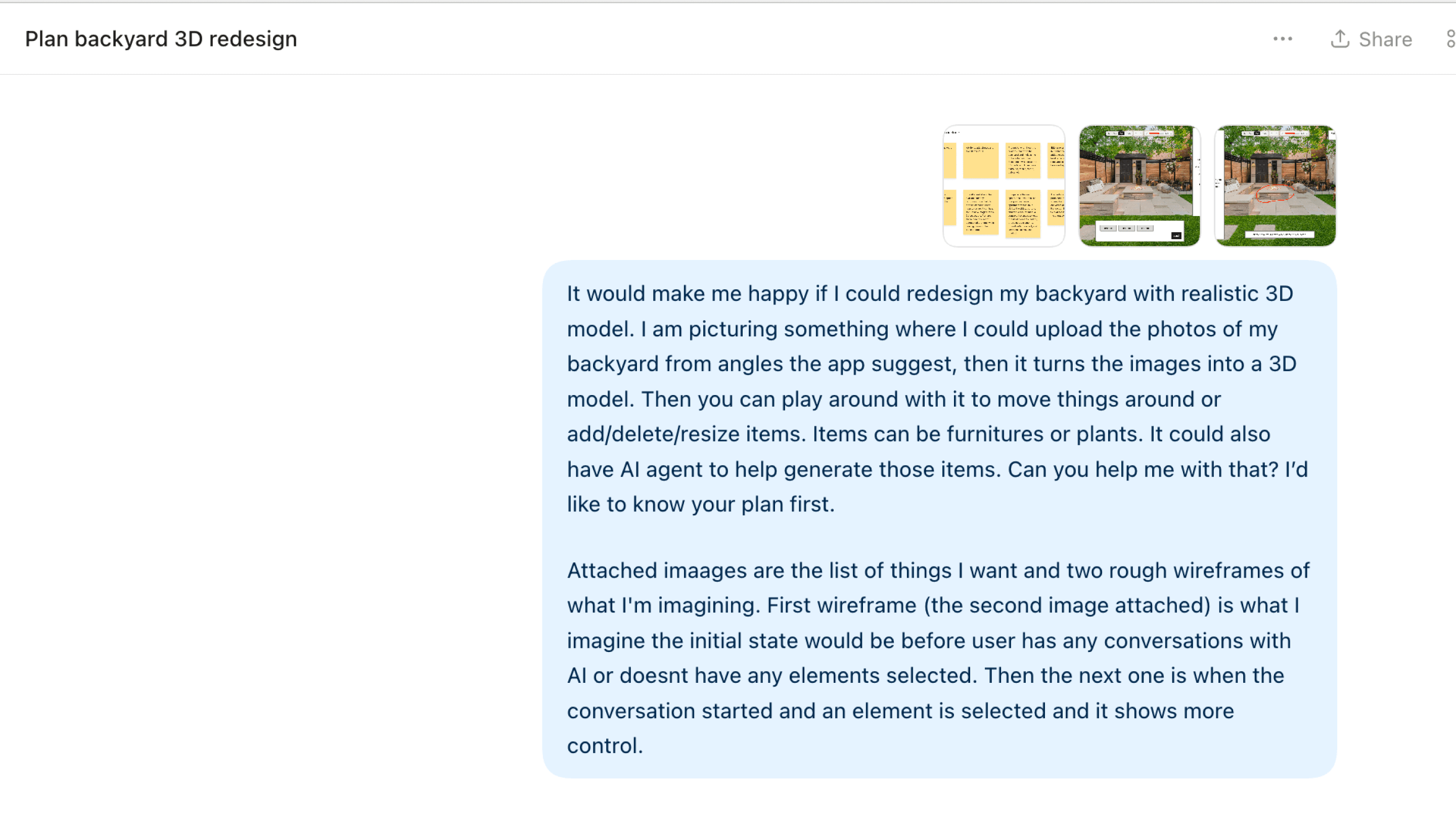
After this prompt and some back and forth, Codex created this with a fake backyard. At this point, I had not sent it any photos or measurements since I just wanted to see its capabilities and token usage.
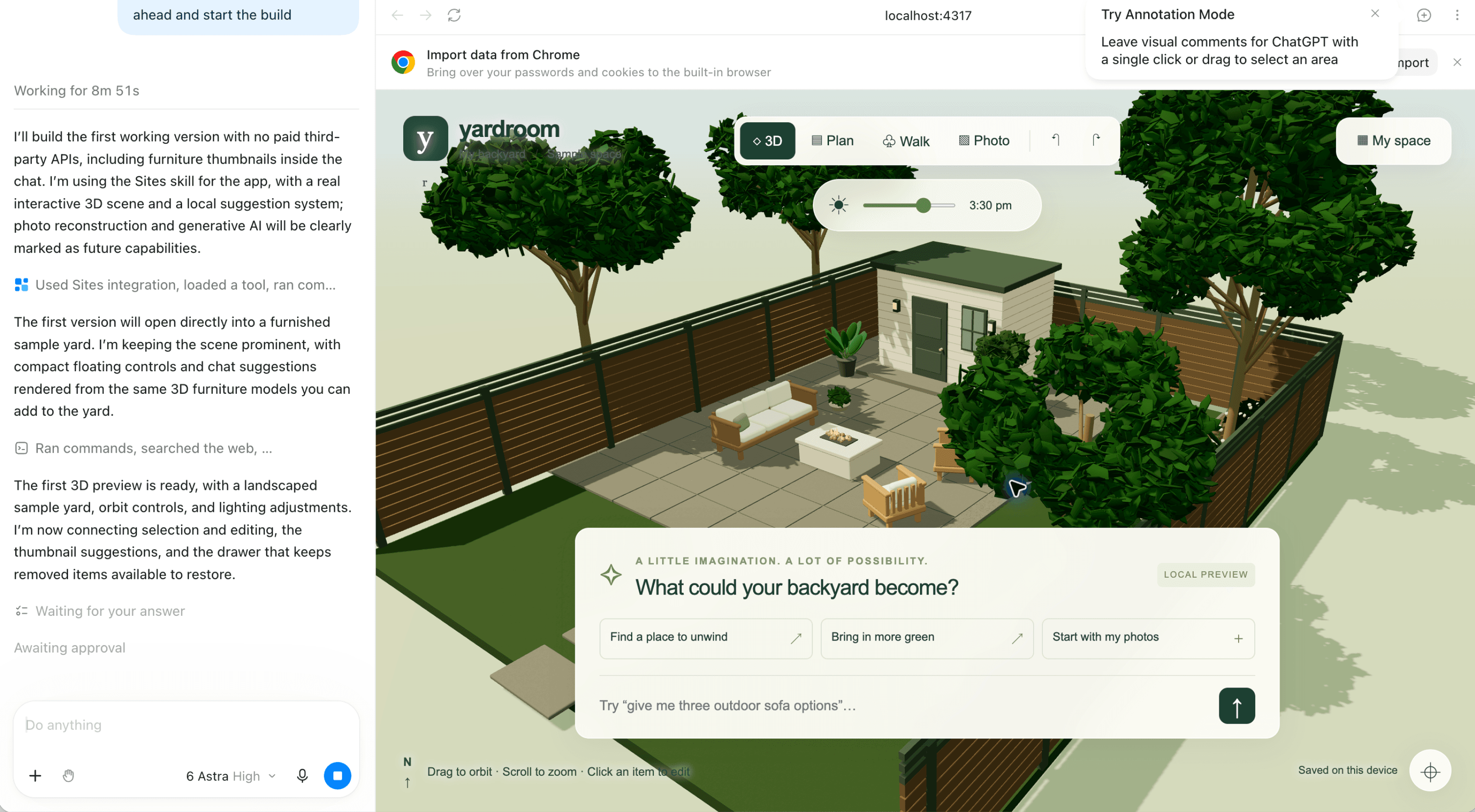
What impressed me was the speed and quality of the 3D output. The 3D models of the backyard and items were significantly better than what I got from Claude with Opus 5.5.
Where it fell short was the execution of the UI. While I provided the wireframe and instructions, it misinterpreted what I was going for, and it also added a lot of extra things that became noise. I also hit the token limit so fast that it couldn't finish everything it planned for until the next token refresh.
Nonetheless, this experiment was totally worth it, because it gave me a clear idea of how I should execute.
Step 3: Assign the right jobs to the right models The experiments in previous steps taught me a few things about the models.
- Opus' UI execution was better than Astra's
- Astra was superior at 3D modeling
- Claude used tokens more efficiently (I never ran out of tokens with Claude, but with Codex I did within 1 hour)
Based on this, I decided to split the job into the following:
- Planning and orchestration partner --> Opus
- 3D modeling --> Astra
- UI development --> Opus or Sonnet
This split ended up working so beautifully that after assigning the right job to the right model, I never ran out of tokens for the rest of the sprint.
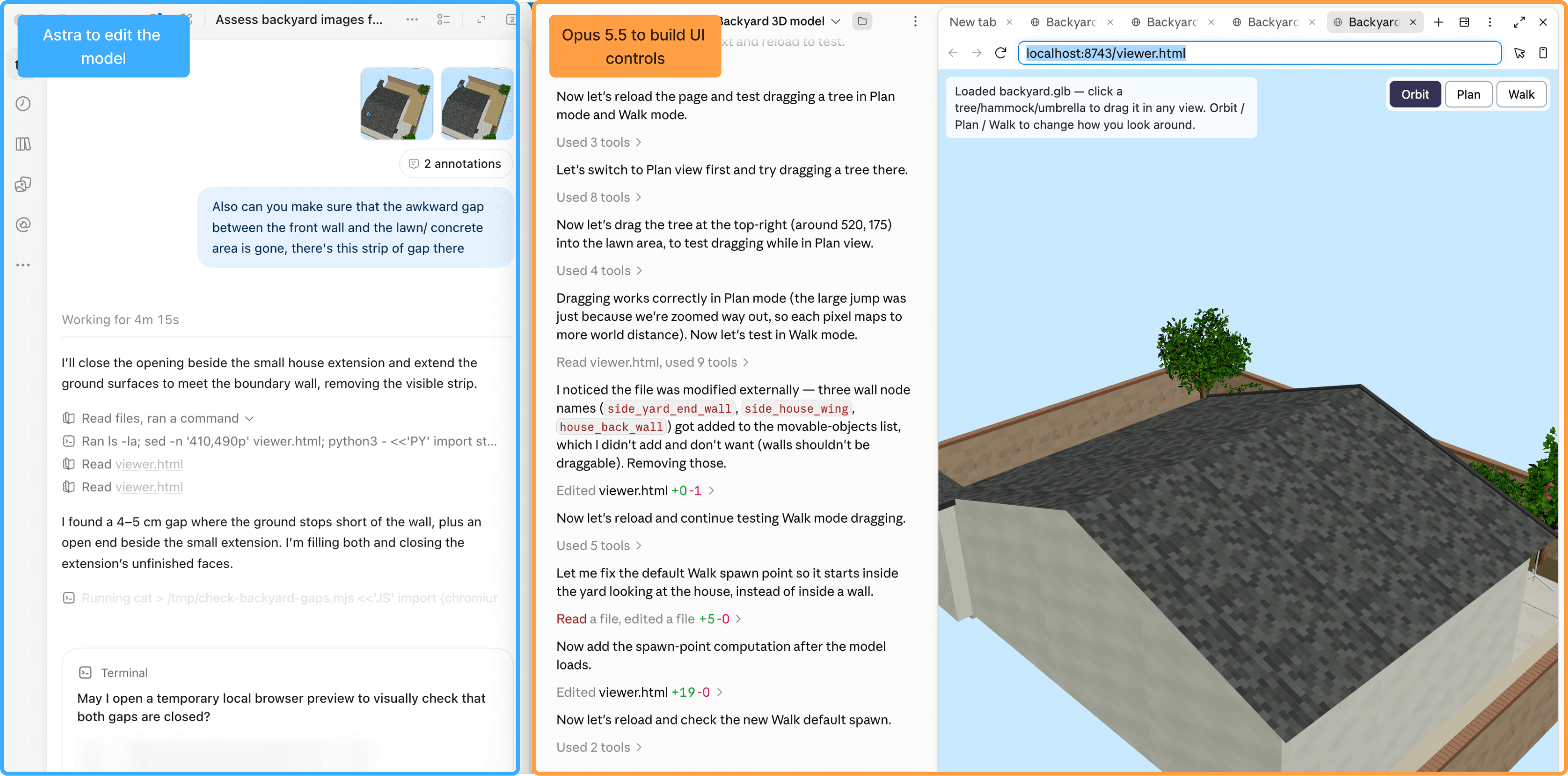
Step 4: Take your hobby to the next level This was such a fun part. I started off by taking a bunch of photos of my backyard, then measurements of all the key parts. Our backyard is small, so luckily measuring it only took about 10 minutes. I made a small drawing of the backyard to visualize the bird's-eye view as well, and sent everything to Codex to build the 3D model.
Before sending a prompt to Codex, I workshopped the prompt with Claude so that the 3D model it produced would be in the right shape for Claude to pick up. Given how fast Codex had burned through tokens, I wanted to be cautious with the prompts so I could increase the chance of getting the right output in one go. The result was arguably the most exciting moment in this sprint. I almost cried.
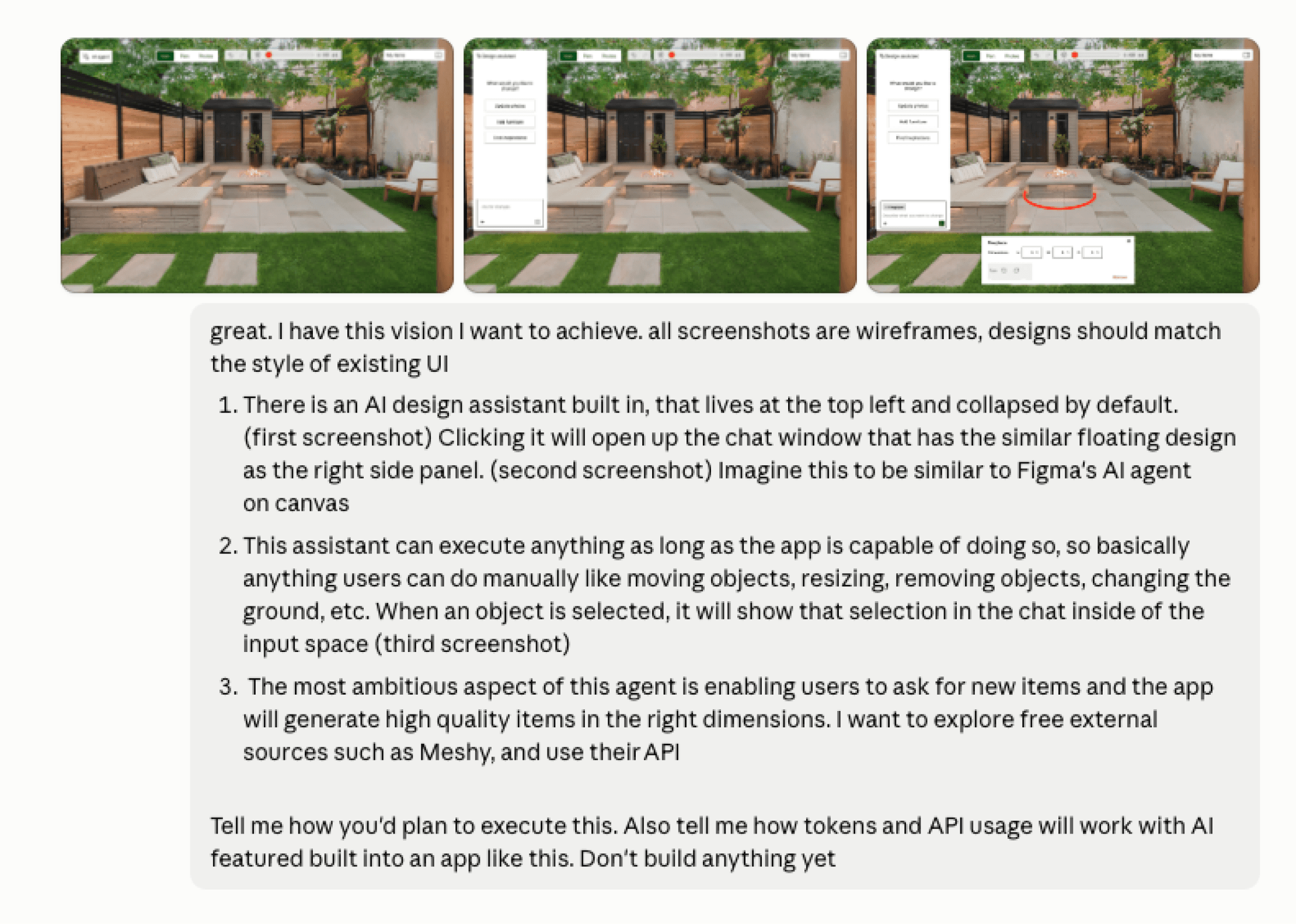
Step 5: Build an actually useful AI feature When I first started this project, I had lots of exciting ideas. I imagined it as The Sims meets Figma meets Pottery Barn. I wanted this virtual yard to have an AI agent, like Figma's, that you could just talk to to change anything in the yard: create new furniture, resize it, move it, or what have you. Maybe I'd even throw in a feature where you could buy that furniture from real shops!
I quickly realized the shopping portion was a bit much for an MVP, but I still wanted to try designing and building the AI agent. It was going to stretch my skills in thinking about an AI agent's interactions. My initial wireframe looked like this:
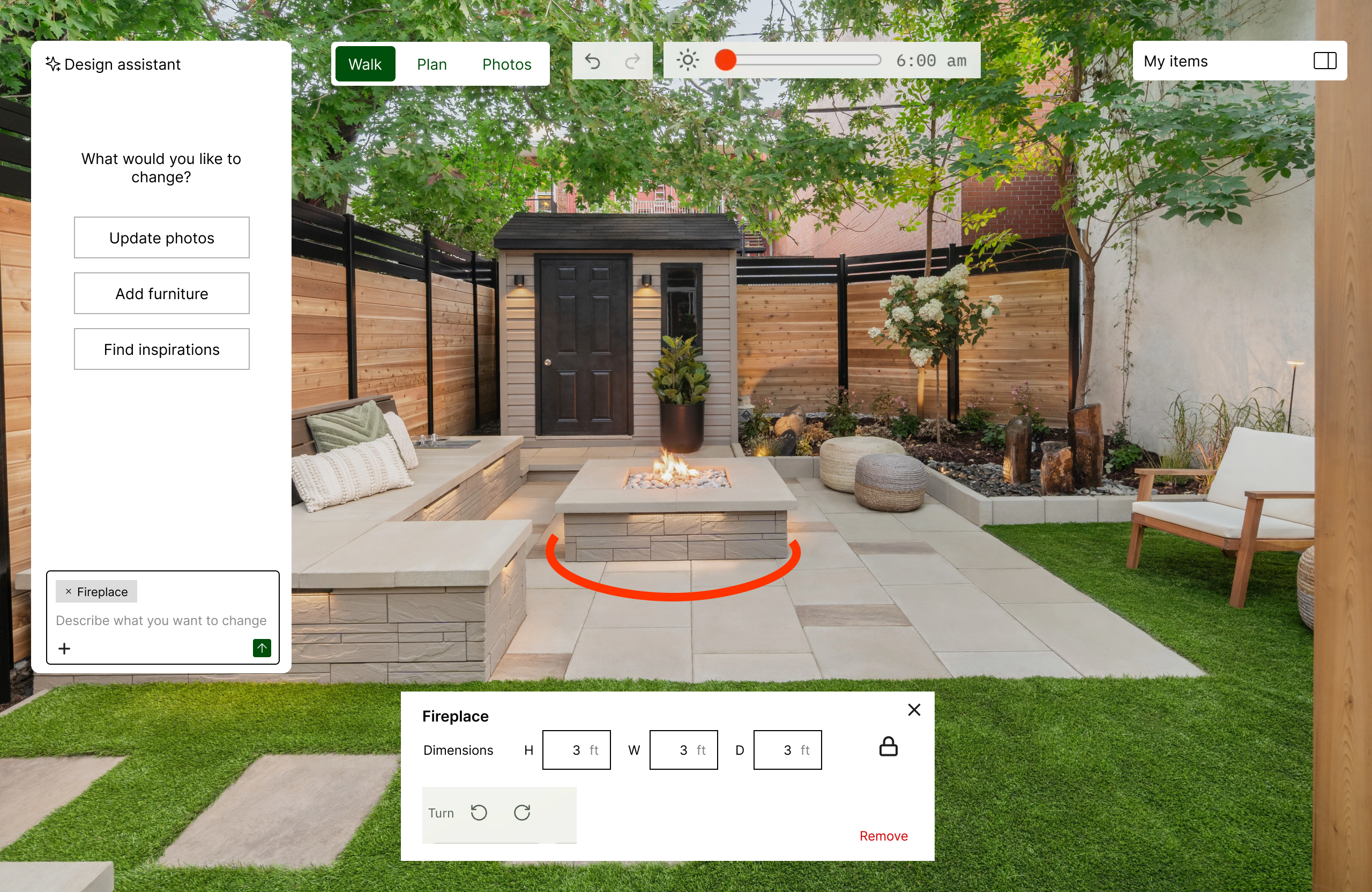
Then, somewhere between designing the interactions in Figma and chatting with Claude about the implementation, I realized this was a feature that was not only ambitious but also expensive to run. AI interactions within an app have to be connected to APIs, and that's a separate cost from my monthly subscription to Claude/Codex. Not knowing what the token usage of these interactions would be, it felt like too much effort and risk for no clear benefit.
Furthermore, if I wanted good AI output, some agent actions had to come from Anthropic's API, while others, like generating a 3D item, had to come from somewhere else. Managing this app was already requiring me to juggle between several applications; I didn't need another thing that I had to keep an eye on.
So what was the feature we really needed? One hurdle that came up in early user research (aka my husband) was that the library of items needed to be much richer. This was where an AI feature could actually be useful. I decided to create about a dozen pre-set items in addition to what was already in the yard, to give enough coverage to start. This included some standard items like a patio couch, table, and fireplace. Then, if users can't find what they're looking for, they can generate them with AI.
The irony is that throughout my previous jobs, I was the one advocating for AI to be used for real problems and telling my stakeholders to resist the urge to throw AI at everything. But in this project, I was on the other end. While it was ironic, it made me understand the urge better. When you experience the magic, it's hard not to be excited and want to do that yourself! Luckily, financial constraints made me think twice.
Step 6: Build yard items (furniture and plants) with Codex/Astra as the foundation for the in-app AI feature Prior to this project, I had never built anything in 3D, and while I am by no means an expert after this week-long project, Claude was an amazing partner in accelerating my learning in the 3D design space.
I learned a little bit about how the 3D components are structured so I could prompt Codex better, and about what tools already existed for this type of work so I could decide the best approach for the in-app item generation feature.
I had Codex run in the background and build items in the project folders directly so Claude could pick them up and show them in the app while it worked on the UI controls.
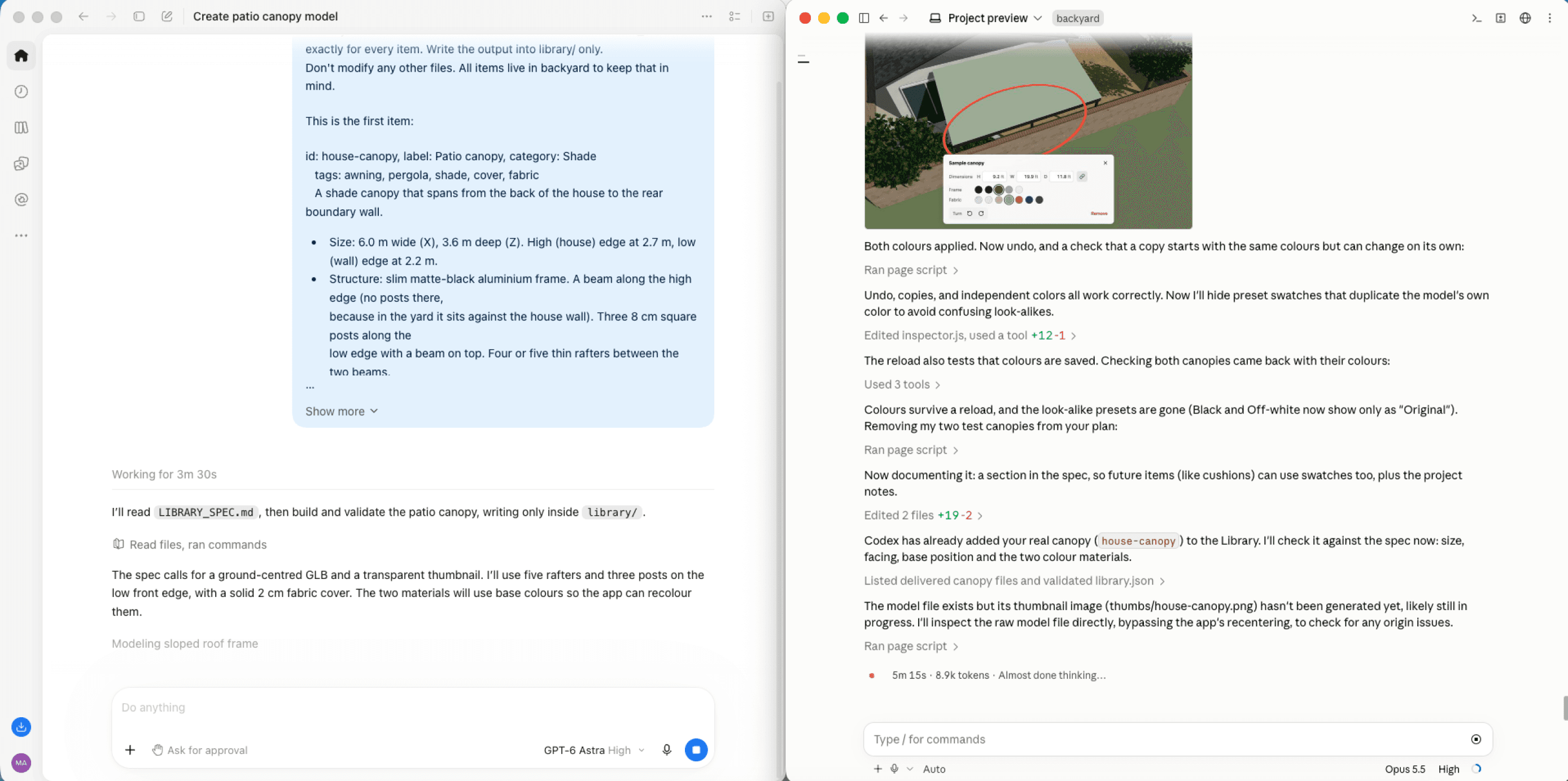
Here, once again, the output of Astra did not disappoint. The look of the pre-generated items fit the theme of the existing space perfectly, with just the right amount of detail to feel realistic.
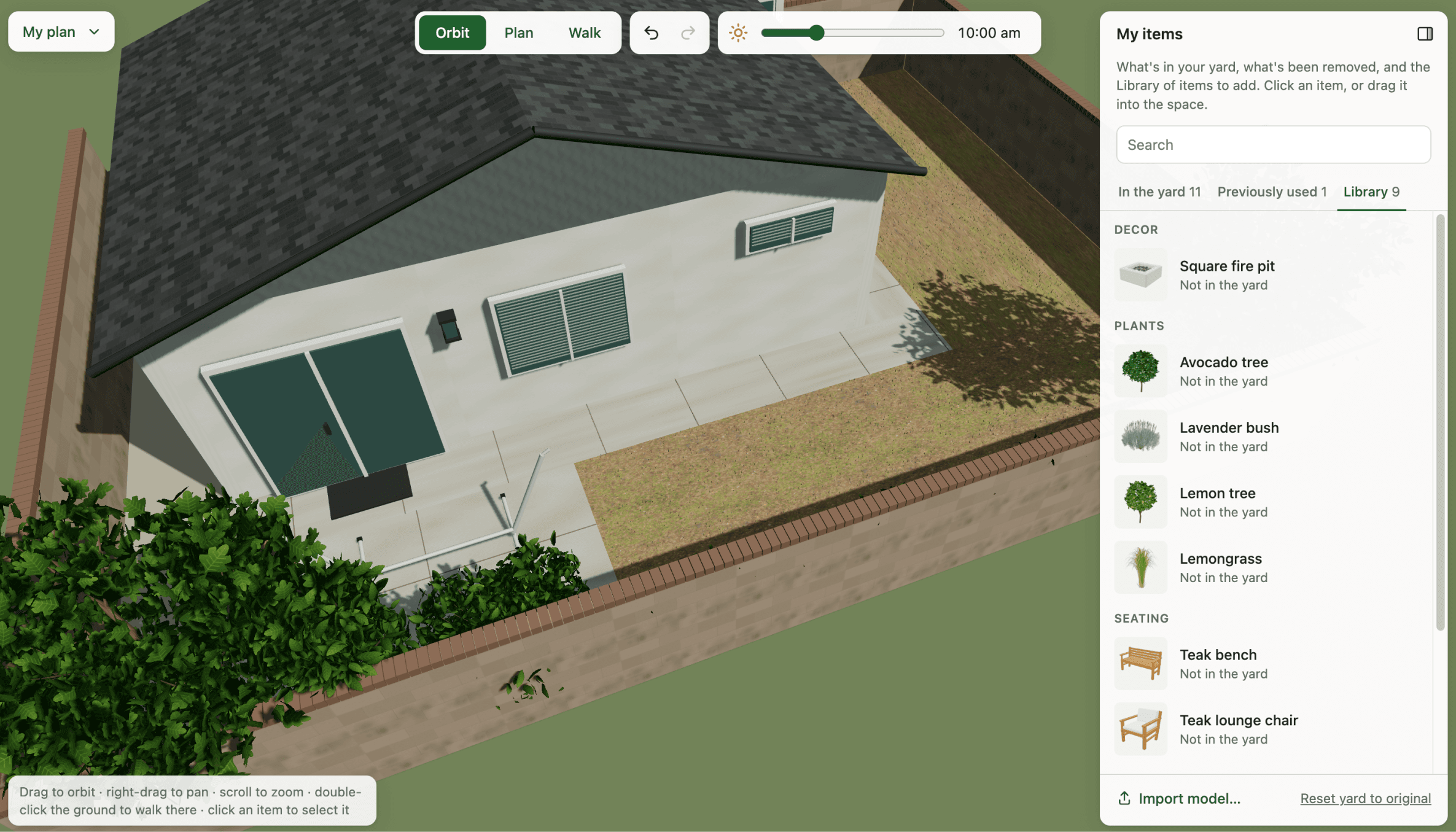
What I was even more delighted to find out was that this had set up a perfect foundation for the in-app item generation. Codex created a specific script to generate items in certain styles, so it only made sense for the in-app AI feature to use this script and call OpenAI's API, so any new item it generates matches the style of the existing ones.
Step 7: Ship, test, and iterate One thing Claude asked during the build that I didn't think much about at first was whether I wanted this to be a shareable, collaborative space. This was a personal project, after all, so it didn't have to be. I could have just kept working in the local files with my husband sitting next to me.
But part of me just wanted to understand how things would work if I made it into a web app with a shared workspace, so I decided to do that. It taught me a bit about how a web app like this differs technically from my portfolio website, which stores no data.
The more we played around with it in prod, the more ideas started flowing. What if it could allow users to upload photos and turn them into a model themselves? This was my original idea, which I deprioritized because, as you can imagine, it was too much for personal use, but wouldn't that be really cool? And what if this could extend beyond just the backyard and could be for the rest of the house? It could have a "room" or "space" concept that lives one layer above. And then of course, what if you could tap a piece of furniture and have it find similar-looking ones in real stores for you?
If you can't tell by now, I had so much fun with this project, and I could have easily kept going. I may pick it up again or continue working on this in the background, so stay tuned for potential future updates!
And if you made it this far, thanks for coming along on this journey with me. It was a long one 😄